Wednesday, 6 October 2010

C++ example of Flyweight Design Pattern

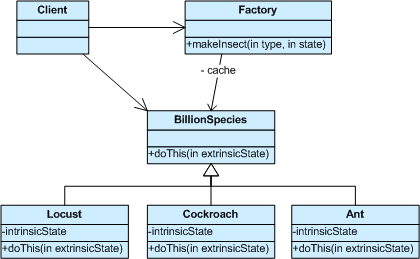
The Flyweight pattern describes how to share objects to allow their use at fine granularities without prohibitive cost. Each “flyweight” object is divided into two pieces: the state-dependent (extrinsic) part, and the state-independent (intrinsic) part. Intrinsic state is stored (shared) in the Flyweight object. Extrinsic state is stored or computed by client objects, and passed to the Flyweight when its operations are invoked.


The Ant, Locust, and Cockroach classes can be “light-weight” because their instance-specific state has been de-encapsulated, or externalized, and must be supplied by the client.
The frequency of use of the flyweight pattern is low.
The following example illustrates the Flyweight pattern:


//Program tested on Microsoft Visual Studio 2008 - Zahid Ghadialy
//Flyweight is part of Structural Patterns
//Structural Patterns deal with decoupling the interface and implementation of classes and objects
//A Flyweight uses sharing to support large numbers of fine-grained objects efficiently.

//We will take an example of charachter class. Each charachter is unique and can have different size
//but the rest of the features will remain the same.

#include<iostream>
#include<string>
#include<map>

using namespace
std;

// The 'Flyweight' abstract class
class Character
{

public
:
virtual
void Display(int pointSize) = 0;

protected
:
char
symbol_;
int
width_;
int
height_;
int
ascent_;
int
descent_;
int
pointSize_;
};


// A 'ConcreteFlyweight' class
class CharacterA : public Character
{

public
:
CharacterA()
{

symbol_ = 'A';
width_ = 120;
height_ = 100;
ascent_ = 70;
descent_ = 0;
pointSize_ = 0; //initialise
}
void
Display(int pointSize)
{

pointSize_ = pointSize;
cout<<symbol_<<" (pointsize "<<pointSize_<<" )"<<endl;
}
};


// A 'ConcreteFlyweight' class
class CharacterB : public Character
{

public
:
CharacterB()
{

symbol_ = 'B';
width_ = 140;
height_ = 100;
ascent_ = 72;
descent_ = 0;
pointSize_ = 0; //initialise
}
void
Display(int pointSize)
{

pointSize_ = pointSize;
cout<<symbol_<<" (pointsize "<<pointSize_<<" )"<<endl;
}
};


//C, D, E,...

// A 'ConcreteFlyweight' class
class CharacterZ : public Character
{

public
:
CharacterZ()
{

symbol_ = 'Z';
width_ = 100;
height_ = 100;
ascent_ = 68;
descent_ = 0;
pointSize_ = 0; //initialise
}
void
Display(int pointSize)
{

pointSize_ = pointSize;
cout<<symbol_<<" (pointsize "<<pointSize_<<" )"<<endl;
}
};


// The 'FlyweightFactory' class
class CharacterFactory
{

public
:
virtual
~CharacterFactory()
{

while
(!characters_.empty())
{

map<char, Character*>::iterator it = characters_.begin();
delete
it->second;
characters_.erase(it);
}
}

Character* GetCharacter(char key)
{

Character* character = NULL;
if
(characters_.find(key) != characters_.end())
{

character = characters_[key];
}

else

{

switch
(key)
{

case
'A':
character = new CharacterA();
break
;
case
'B':
character = new CharacterB();
break
;
//...
case 'Z':
character = new CharacterZ();
break
;
default
:
cout<<"Not Implemented"<<endl;
throw
("Not Implemented");
}

characters_[key] = character;
}

return
character;
}

private
:
map<char, Character*> characters_;
};


//The Main method
int main()
{

string document = "AAZZBBZB";
const
char* chars = document.c_str();

CharacterFactory* factory = new CharacterFactory;

// extrinsic state
int pointSize = 10;

// For each character use a flyweight object
for(size_t i = 0; i < document.length(); i++)
{

pointSize++;
Character* character = factory->GetCharacter(chars[i]);
character->Display(pointSize);
}


//Clean memory
delete factory;

return
0;
}


Wednesday, 29 September 2010

C++ example for Facade Design Pattern


Frequently, as your programs evolve and develop, they grow in complexity. In fact, for all the excitement about using design patterns, these patterns sometimes generate so many classes that it is difficult to understand the program’s flow. Furthermore, there may be a number of complicated subsystems, each of which has its own complex interface.

The Façade pattern allows you to simplify this complexity by providing a simplified interface to these subsystems. This simplification may in some cases reduce the flexibility of the underlying classes, but usually provides all the function needed for all but the most sophisticated users. These users can still, of course, access the underlying classes and methods.

Facade takes a “riddle wrapped in an enigma shrouded in mystery”, and interjects a wrapper that tames the amorphous and inscrutable mass of software.

The frequency of use for Facade is very high.

C++ example as follows:


//Program tested on Microsoft Visual Studio 2008 - Zahid Ghadialy
//Façade is part of Structural Patterns
//Structural Patterns deal with decoupling the interface and implementation of classes and objects
//A Facade is single class that represents an entire subsystem

//The example we consider here is a case of a customer applying for mortgage
//The bank has to go through various checks to see if Mortgage can be approved for the customer
//The facade class goes through all these checks and returns if the morgage is approved

#include<iostream>
#include<string>

using namespace
std;

// Customer class
class Customer
{

public
:
Customer (const string& name) : name_(name){}
const
string& Name(void)
{

return
name_;
}

private
:
Customer(); //not allowed
string name_;
};


// The 'Subsystem ClassA' class
class Bank
{

public
:
bool
HasSufficientSavings(Customer c, int amount)
{

cout << "Check bank for " <<c.Name()<<endl;
return
true;
}
};


// The 'Subsystem ClassB' class
class Credit
{

public
:
bool
HasGoodCredit(Customer c, int amount)
{

cout << "Check credit for " <<c.Name()<<endl;
return
true;
}
};


// The 'Subsystem ClassC' class
class Loan
{

public
:
bool
HasGoodCredit(Customer c, int amount)
{

cout << "Check loans for " <<c.Name()<<endl;
return
true;
}
};


// The 'Facade' class
class Mortgage
{

public
:
bool
IsEligible(Customer cust, int amount)
{

cout << cust.Name() << " applies for a loan for $" << amount <<endl;
bool
eligible = true;

eligible = bank_.HasSufficientSavings(cust, amount);

if
(eligible)
eligible = loan_.HasGoodCredit(cust, amount);

if
(eligible)
eligible = credit_.HasGoodCredit(cust, amount);

return
eligible;
}


private
:
Bank bank_;
Loan loan_;
Credit credit_;
};


//The Main method
int main()
{

Mortgage mortgage;
Customer customer("Brad Pitt");

bool
eligible = mortgage.IsEligible(customer, 1500000);

cout << "\n" << customer.Name() << " has been " << (eligible ? "Approved" : "Rejected") << endl;

return
0;
}


The output is as follows:


More on Facade:

http://sourcemaking.com/design_patterns/facade

http://www.patterndepot.com/put/8/facade.pdf

http://sourcemaking.com/design_patterns/facade

Wednesday, 22 September 2010

C++ example for Decorator Design Pattern


The Decorator Pattern is used for adding additional functionality to a particular object as opposed to a class of objects. It is easy to add functionality to an entire class of objects by subclassing an object, but it is impossible to extend a single object this way. With the Decorator Pattern, you can add functionality to a single object and leave others like it unmodified.

A Decorator, also known as a Wrapper, is an object that has an interface identical to an object that it contains. Any calls that the decorator gets, it relays to the object that it contains, and adds its own functionality along the way, either before or after the call. This gives you a lot of flexibility, since you can change what the decorator does at runtime, as opposed to having the change be static and determined at compile time by subclassing. Since a Decorator complies with the interface that the object that it contains, the Decorator is indistinguishable from the object that it contains. That is, a Decorator is a concrete instance of the abstract class, and thus is indistinguishable from any other concrete instance, including other decorators. This can be used to great advantage, as you can recursively nest decorators without any other objects being able to tell the difference, allowing a near infinite amount of customization.

Decorators add the ability to dynamically alter the behavior of an object because a decorator can be added or removed from an object without the client realizing that anything changed. It is a good idea to use a Decorator in a situation where you want to change the behaviour of an object repeatedly (by adding and subtracting functionality) during runtime.

The dynamic behavior modification capability also means that decorators are useful for adapting objects to new situations without re-writing the original object's code.

The frequency for use of Decorator is medium. The following is example code for this pattern:


//Program tested on Microsoft Visual Studio 2008 - Zahid Ghadialy
//Decorator is part of Structural Patterns
//Structural Patterns deal with decoupling the interface and implementation of classes and objects
//The Decorator pattern provides us with a way to modify the behavior of individual objects without
// having to create a new derived class.

//The example here shows a Library that contains information about the books
//After the class was created, it was decided to have a borrowable functionality added

#include<iostream>
#include<string>
#include<list>

using namespace
std;

// The 'Component' abstract class
class LibraryItem
{

public
:
void
SetNumCopies(int value)
{

numCopies_ = value;
}

int
GetNumCopies(void)
{

return
numCopies_;
}

virtual
void Display(void)=0;
private
:
int
numCopies_;
};


// The 'ConcreteComponent' class#1
class Book : public LibraryItem
{

public
:
Book(string author, string title, int numCopies) : author_(author), title_(title)
{

SetNumCopies(numCopies);
}

void
Display(void)
{

cout<<"\nBook ------ "<<endl;
cout<<" Author : "<<author_<<endl;
cout<<" Title : "<<title_<<endl;
cout<<" # Copies : "<<GetNumCopies()<<endl;
}

private
:
Book(); //Default not allowed
string author_;
string title_;
};


// The 'ConcreteComponent' class#2
class Video : public LibraryItem
{

public
:
Video(string director, string title, int playTime, int numCopies) : director_(director), title_(title), playTime_(playTime)
{

SetNumCopies(numCopies);
}

void
Display(void)
{

cout<<"\nVideo ------ "<<endl;
cout<<" Director : "<<director_<<endl;
cout<<" Title : "<<title_<<endl;
cout<<" Play Time : "<<playTime_<<" mins"<<endl;
cout<<" # Copies : "<<GetNumCopies()<<endl;
}

private
:
Video(); //Default not allowed
string director_;
string title_;
int
playTime_;
};


// The 'Decorator' abstract class
class Decorator : public LibraryItem
{

public
:
Decorator(LibraryItem* libraryItem) : libraryItem_(libraryItem) {}
void
Display(void)
{

libraryItem_->Display();
}

int
GetNumCopies(void)
{

return
libraryItem_->GetNumCopies();
}

protected
:
LibraryItem* libraryItem_;
private
:
Decorator(); //not allowed
};

// The 'ConcreteDecorator' class
class Borrowable : public Decorator
{

public
:
Borrowable(LibraryItem* libraryItem) : Decorator(libraryItem) {}
void
BorrowItem(string name)
{

borrowers_.push_back(name);
}

void
ReturnItem(string name)
{

list<string>::iterator it = borrowers_.begin();
while
(it != borrowers_.end())
{

if
(*it == name)
{

borrowers_.erase(it);
break
;
}
++
it;
}
}

void
Display()
{

Decorator::Display();
int
size = (int)borrowers_.size();
cout<<" # Available Copies : "<<(Decorator::GetNumCopies() - size)<<endl;
list<string>::iterator it = borrowers_.begin();
while
(it != borrowers_.end())
{

cout<<" borrower: "<<*it<<endl;
++
it;
}
}

protected
:
list<string> borrowers_;
};


//The Main method
int main()
{

Book book("Erik Dahlman","3G evolution",6);
book.Display();

Video video("Peter Jackson", "The Lord of the Rings", 683, 24);
video.Display();

cout<<"Making video borrowable"<<endl;
Borrowable borrowvideo(&video);
borrowvideo.BorrowItem("Bill Gates");
borrowvideo.BorrowItem("Steve Jobs");
borrowvideo.Display();

return
0;
}


The output is as follows:


For more information see:

http://www.dofactory.com/Patterns/PatternDecorator.aspx

http://sourcemaking.com/design_patterns/decorator

http://www.patterndepot.com/put/8/Decorator.pdf

http://www.exciton.cs.rice.edu/javaresources/designpatterns/decoratorpattern.htm

Wednesday, 15 September 2010

C++ example for Composite Design Pattern


Compose objects into tree structures to represent part-whole hierarchies. Composite lets clients treat individual objects and compositions of objects uniformly. The frequency of use of this is medium high.

The Intent of the 'Composite Pattern' is:
  • Compose objects into tree structures to represent whole-part hierarchies. Composite lets clients treat individual objects and compositions of objects uniformly.
  • Recursive composition
  • “Directories contain entries, each of which could be a directory.”
  • 1-to-many “has a” up the “is a” hierarchy
C++ example as follows:


//Program tested on Microsoft Visual Studio 2008 - Zahid Ghadialy
//Composite is part of Structural Patterns
//Structural Patterns deal with decoupling the interface and implementation of classes and objects
//Composite pattern forms a tree structure of simple and composite objects

//The example here

#include<iostream>
#include<string>
#include<vector>

using namespace
std;

//The 'Component' Treenode
class DrawingElement
{

public
:
DrawingElement(string name) : name_(name) {};
virtual
void Add(DrawingElement* d) = 0;
virtual
void Remove(DrawingElement* d) = 0;
virtual
void Display(int indent) = 0;
virtual
~DrawingElement() {};
protected
:
string name_;
private
:
DrawingElement(); //not allowed
};

//The 'Leaf' class
class PrimitiveElement : public DrawingElement
{

public
:
PrimitiveElement(string name) : DrawingElement(name){};
void
Add(DrawingElement* d)
{

cout<<"Cannot add to a PrimitiveElement"<<endl;
}

void
Remove(DrawingElement* d)
{

cout<<"Cannot remove from a PrimitiveElement"<<endl;
}

void
Display(int indent)
{

string newStr(indent, '-');
cout << newStr << " " << name_ <<endl;
}

virtual
~PrimitiveElement(){};
private
:
PrimitiveElement(); //not allowed
};

//The 'Composite' class
class CompositeElement : public DrawingElement
{

public
:
CompositeElement(string name) : DrawingElement(name) {};
void
Add(DrawingElement* d)
{

elements_.push_back(d);
}

void
Remove(DrawingElement* d)
{

vector<DrawingElement*>::iterator it = elements_.begin();
while
(it != elements_.end())
{

if
(*it == d)
{

delete
d;
elements_.erase(it);
break
;
}
++
it;
}
}

void
Display(int indent)
{

string newStr(indent, '-');
cout << newStr << "+ " << name_ <<endl;
vector<DrawingElement*>::iterator it = elements_.begin();
while
(it != elements_.end())
{
(*
it)->Display(indent + 2);
++
it;
}
}

virtual
~CompositeElement()
{

while
(!elements_.empty())
{

vector<DrawingElement*>::iterator it = elements_.begin();
delete
*it;
elements_.erase(it);
}
}

private
:
CompositeElement(); //not allowed
vector<DrawingElement*> elements_;

};


//The Main method
int main()
{

//Create a Tree Structure
CompositeElement* root = new CompositeElement("Picture");
root->Add(new PrimitiveElement("Red Line"));
root->Add(new PrimitiveElement("Blue Circle"));
root->Add(new PrimitiveElement("Green Box"));

//Create a Branch
CompositeElement* comp = new CompositeElement("Two Circles");
comp->Add(new PrimitiveElement("Black Circle"));
comp->Add(new PrimitiveElement("White Circle"));
root->Add(comp);

//Add and remove a primitive elements
PrimitiveElement* pe1 = new PrimitiveElement("Yellow Line");
root->Add(pe1);
PrimitiveElement* pe2 = new PrimitiveElement("Orange Triangle");
root->Add(pe2);
root->Remove(pe1);

//Recursively display nodes
root->Display(1);

//delete the allocated memory
delete root;

return
0;
}


The output is as follows:
For more information see:

Wednesday, 8 September 2010

C++ example for Bridge Design Pattern

The Bridge pattern decouples an abstraction from its implementation, so that the two can vary independently. A household switch controlling lights, ceiling fans, etc. is an example of the Bridge. The purpose of the switch is to turn a device on or off. The actual switch can be implemented as a pull chain, simple two position switch, or a variety of dimmer switches.


Differences between Bridge, Adapter and other patterns
  • Adapter makes things work after they’re designed; Bridge makes them work before they are.
  • Bridge is designed up-front to let the abstraction and the implementation vary independently. Adapter is retrofitted to make unrelated classes work together.
  • State, Strategy, Bridge (and to some degree Adapter) have similar solution structures. They all share elements of the “handle/body” idiom. They differ in intent - that is, they solve different problems.
  • The structure of State and Bridge are identical (except that Bridge admits hierarchies of envelope classes, whereas State allows only one). The two patterns use the same structure to solve different problems: State allows an object’s behavior to change along with its state, while Bridge’s intent is to decouple an abstraction from its implementation so that the two can vary independently.
  • If interface classes delegate the creation of their implementation classes (instead of creating/coupling themselves directly), then the design usually uses the Abstract Factory pattern to create the implementation objects.
The frequency of use of Bridge is medium and the UML diagram is as follows:


Example of Bridge as follows:


//Program tested on Microsoft Visual Studio 2008 - Zahid Ghadialy
//Bridge is part of Structural Patterns
//Structural Patterns deal with decoupling the interface and implementation of classes and objects
//Bridge separates an object's interface from its implementation


#include<iostream>
#include<string>
#include<list>

using namespace
std;

//The 'Implementor' abstract class
class DataObject
{

public
:
virtual
void NextRecord()=0;
virtual
void PriorRecord()=0;
virtual
void AddRecord(string name)=0;
virtual
void DeleteRecord(string name)=0;
virtual
void ShowRecord()=0;
virtual
void ShowAllRecords()=0;
};


//The 'ConcreteImplementor' class
class CustomersData : public DataObject
{

public
:
CustomersData()
{

current_ = 0;
}

void
NextRecord()
{

if
(current_ < (int)(customers_.size() - 1))
current_++;
}

void
PriorRecord()
{

if
(current_ > 0)
current_--;
}

void
AddRecord(string name)
{

customers_.push_back(name);
}

void
DeleteRecord(string name)
{

list<string>::iterator it = customers_.begin();
while
(it != customers_.end())
{

if
(*it == name)
{

customers_.erase(it);
break
;
}
++
it;
}
}

void
ShowRecord()
{

list<string>::iterator it = customers_.begin();
for
(int i = 0; i < current_; i++, ++it);
cout<<*it<<endl;
}

void
ShowAllRecords()
{

list<string>::iterator it = customers_.begin();
while
(it != customers_.end())
{

cout<<*it<<endl;
++
it;
}
}

private
:
int
current_;
list<string> customers_;
};


//The 'Abstraction' class
class CustomersBase
{

public
:
CustomersBase(string group):group_(group){};
void
SetDataObject(DataObject* value)
{

dataObject_ = value;
}

DataObject* GetDataObject(void)
{

return
dataObject_;
}

virtual
void Next()
{

dataObject_->NextRecord();
}

virtual
void Prior()
{

dataObject_->PriorRecord();
}

virtual
void Add(string customer)
{

dataObject_->AddRecord(customer);
}

virtual
void Delete(string customer)
{

dataObject_->DeleteRecord(customer);
}

virtual
void Show()
{

dataObject_->ShowRecord();
}

virtual
void ShowAll()
{

cout<<"Customer Group : "<<group_<<endl;
dataObject_->ShowAllRecords();
}

protected
:
string group_;
private
:
DataObject* dataObject_;
};


//The 'RefinedAbstraction' class
class Customers : public CustomersBase
{

public
:
Customers(string group) : CustomersBase(group) {};
//overriding
void ShowAll()
{

cout<<"\n------------------------------------"<<endl;
CustomersBase::ShowAll();
cout<<"------------------------------------"<<endl;
}
};


//Main
int main()
{

//Create RefinedAbstraction
Customers* customers = new Customers("London");

//Set ConcreteImplementor
CustomersData* customersData = new CustomersData();
DataObject* dataObject = customersData;

customersData->AddRecord("Tesco");
customersData->AddRecord("Sainsburys");
customersData->AddRecord("Asda");
customersData->AddRecord("Morrisons");
customersData->AddRecord("Lidl");
customersData->AddRecord("Co-op");

customers->SetDataObject(dataObject);

//Exercise the bridge
customers->Show();
customers->Next();
customers->Show();
customers->Next();
customers->Show();
customers->Add("M&S");

customers->ShowAll();


return
0;
}


The Output is as follows:


For more information see:
http://www.dofactory.com/Patterns/PatternBridge.aspx
http://sourcemaking.com/design_patterns/bridge
http://www.vincehuston.org/dp/bridge.html

Wednesday, 1 September 2010

C++ example for Adapter Design Pattern

The Adapter pattern is used to convert the programming interface of one class into that of another. We use adapters whenever we want unrelated classes to work together in a single program. The concept of an adapter is thus pretty simple; we write a class that has the desired interface and then make it communicate with the class that has a different interface.

There are two ways to do this: by inheritance, and by object composition. In the first case, we derive a new class from the nonconforming one and add the methods we need to make the new derived class match the desired interface. The other way is to include the original class inside the new one and create the methods to translate calls within the new class. These two approaches are termed as class adapters and object adapters respectively.

The frequency of usage of adapter pattern is medium high.

Example of Adapter pattern as follows:


//Program tested on Microsoft Visual Studio 2008 - Zahid Ghadialy
//Adapter is part of Structural Patterns
//Structural Patterns deal with decoupling the interface and implementation of classes and objects
//Adapter pattern is used to convert the programming interface of one class into that of another.

//We Take an example where chemical compound objects accesses the databank
//through an Adapter Interface

#include<iostream>
#include<string>

using namespace
std;

//The 'Target' class
class Compound
{

public
:
Compound(string chemical):chemical_(chemical){}
virtual
~Compound() {};
void
Display()
{

cout << "\nCompound: " << chemical_ << "----------------" << endl;
}

protected
:
string chemical_;
float
boilingPoint_;
float
meltingPoint_;
double
molecularWeight_;
string molecularFormula_;
private
:
Compound(); //disallow default constructor
};

//The 'Adaptee' class
class ChemicalDatabank
{

public
:
virtual
~ChemicalDatabank() {};
//The databank 'legacy API'
float GetCriticalPoint(string compound, string point)
{

string lowerCompound = toLowerString(compound);
//Melting Point
if (point == "M")
{

if
(_stricmp(lowerCompound.c_str(), "water") == 0)
return
0.0;
else if
(_stricmp(lowerCompound.c_str(), "benzene") == 0)
return
5.5;
else if
(_stricmp(lowerCompound.c_str(), "ethanol") == 0)
return
(float) -114.1;
else
return
0.0;
}

//Boiling point
else
{

if
(_stricmp(lowerCompound.c_str(), "water") == 0)
return
(float) 100.0;
else if
(_stricmp(lowerCompound.c_str(), "benzene") == 0)
return
(float) 80.1;
else if
(_stricmp(lowerCompound.c_str(), "ethanol") == 0)
return
(float) 78.3;
else
return
0.0;
}
}


string GetMolecularStructure(string compound)
{

string lowerCompound = toLowerString(compound);

if
(_stricmp(lowerCompound.c_str(), "water") == 0)
return
"H2O";
else if
(_stricmp(lowerCompound.c_str(), "benzene") == 0)
return
"C6H6";
else if
(_stricmp(lowerCompound.c_str(), "ethanol") == 0)
return
"C2H5OH";
else
return
"";
}


double
GetMolecularWeight(string compound)
{

string lowerCompound = toLowerString(compound);

if
(_stricmp(lowerCompound.c_str(), "water") == 0)
return
18.015;
else if
(_stricmp(lowerCompound.c_str(), "benzene") == 0)
return
78.1134;
else if
(_stricmp(lowerCompound.c_str(), "ethanol") == 0)
return
46.0688;
else
return
0.0;
}

private
:
//Helper function
string toLowerString(string& input)
{

int
length = input.length();
string output;
for
(int i = 0; i < length; i++)
{

output += tolower(input[i]);
}

return
output;
}
};


//The 'Adapter' class
class RichCompound : public Compound
{

public
:
RichCompound(string name) : Compound(name)
{

bank_ = new ChemicalDatabank();
}

virtual
~RichCompound()
{

delete
bank_;
}

void
Display()
{

boilingPoint_ = bank_->GetCriticalPoint(chemical_, "B");
meltingPoint_ = bank_->GetCriticalPoint(chemical_, "M");
molecularWeight_ = bank_->GetMolecularWeight(chemical_);
molecularFormula_ = bank_->GetMolecularStructure(chemical_);

Compound::Display();
cout << " Formula : " << molecularFormula_ << endl;
cout << " Weight : " << molecularWeight_ << endl;
cout << " Melting Pt : " << meltingPoint_ << endl;
cout << " Boiling Pt : " << boilingPoint_ << endl;
}

private
:
ChemicalDatabank* bank_;
RichCompound(); //dis-allow default constructor
};

int
main()
{

Compound unknown("Unknown");
unknown.Display();

RichCompound water("Water");
water.Display();

RichCompound benzene("Benzene");
benzene.Display();

RichCompound ethanol("Ethanol");
ethanol.Display();

RichCompound zahid("Zahid");
zahid.Display();

return
0;
}


The output is as follows:


For more details, please see:

http://www.dofactory.com/Patterns/PatternAdapter.aspx
http://www.patterndepot.com/put/8/adapter.pdf

Wednesday, 25 August 2010

An example of replacing part of strings

Taking a bit of break from the Design Patterns this week. We look at a simple example of replacing part of the strings. For example you may have a program which prints out some customised letter. You may want to replace the default name with the name of a person that can be input on command line.


Example as follows:


//Program tested on Microsoft Visual Studio 2008 - Zahid Ghadialy
#include<iostream>
#include<string>

using namespace
std;

int
main()
{

string s1 = "Hello is that Tom? Are you ok Tom? Take Care tom!";
string s2 = "Tom";
string s3 = "William";

cout << "s1 = " << s1 << endl;

//Find s2 and replace by s3
bool flag = true;
while
(flag)
{

size_t found = s1.find(s2);
if
(found != string::npos)
{

s1.replace(found, s2.length(), s3);
}

else

{

flag = false;
}
}


cout << "s1 = " << s1 << endl;

return
0;
}


The output is as follows:


Friday, 20 August 2010

C++ example for Singleton Design Pattern


The Singleton Design Pattern which is widely used ensures that there is a single instance of the object and it also provides a global point of access to it.
I have covered couple of examples on Singletons in past and you are welcome to refer to them as an example for this design pattern. The simple example is here and a more involved one is here.
To learn more about Singletons see:

Tuesday, 17 August 2010

C++ example for Prototype Design Pattern

The Protoype pattern is used when creating an instance of a class is very time-consuming or complex in some way. Then, rather than creating more instances, you make copies of the original instance, modifying them as appropriate.


Prototypes can also be used whenever you need classes that differ only in the type of processing they offer, for example in parsing of strings representing numbers in different radixes. This design pattern is not used very frequently.

The following is an example of Prototype Design Pattern:

//Program tested on Microsoft Visual Studio 2008 - Zahid Ghadialy
//Prototype is part of Creational Patterns
//Creational Patterns deal with initializing and configuring classes and objects
//Prototype creates a fully initialized instance to be copied or cloned

//We will take an example of creating Colour class.
//There are three parts to colour - Red, Green and Blue
//Simple colours like Red only contain the red component
//Complex colours like Angry and Peace contains all three components

#include <iostream>
#include <string>
#include <iomanip>
#include <map>

using namespace
std;

//The abstract 'Protoype' class
class ColourPrototype
{

public
:
virtual
ColourPrototype* Clone(void) = 0;
};


//The 'ConcretePrototype' class
class Colour : public ColourPrototype
{

public
:
Colour(int red, int green, int blue)
{

red_ = red, green_ = green, blue_ = blue;
}

ColourPrototype* Clone(void)
{

cout << "Cloning colour RGB: " << setw(3) << red_ << ", " << setw(3) << green_ <<", " << setw(3) << blue_ <<endl;
ColourPrototype* colourPrototype = new Colour(red_, green_, blue_);
return
colourPrototype;
}

void
SetRed(int red)
{

red_ = red;
}

void
SetGreen(int green)
{

green_ = green;
}

void
SetBlue(int blue)
{

blue_ = blue;
}

int
GetRed(void)
{

return
red_;
}

int
GetGreen(void)
{

return
green_;
}

int
GetBlue(void)
{

return
blue_;
}


private
:
Colour(); //default constructor not allowed
int red_, green_, blue_;
};


//Prototype manager
class ColourManager
{

public
:
virtual
~ColourManager()
{

while
(!coloursMap_.empty())
{

map<string, ColourPrototype*>::iterator it = coloursMap_.begin();
delete
it->second;
coloursMap_.erase(it);
}
}

void
AddColour(const string& colour, ColourPrototype* prototype)
{

coloursMap_[colour] = prototype;
}

ColourPrototype* GetColour(const string& colour)
{

map<string, ColourPrototype*>::const_iterator it = coloursMap_.find(colour);
if
(it != coloursMap_.end())
return
it->second;
return
NULL;
}

void
PrintColours(void)
{

cout << "\nAvailable Colours and their values " << endl;
map<string, ColourPrototype*>::const_iterator it = coloursMap_.begin();
while
(it != coloursMap_.end())
{

cout << setw(20) << it->first << " : ";
cout << setw(3) << dynamic_cast<Colour*>(it->second)->GetRed() << ", ";
cout << setw(3) << dynamic_cast<Colour*>(it->second)->GetGreen() << ", ";
cout << setw(3) << dynamic_cast<Colour*>(it->second)->GetBlue() << endl;
++
it;
}
}

private
:
map<string, ColourPrototype*> coloursMap_;
};


//The Main method
int main()
{

ColourManager* colourManager = new ColourManager();

//Add simple colours
colourManager->AddColour("Red", new Colour(255, 0, 0));
colourManager->AddColour("Green", new Colour(0, 255, 0));
colourManager->AddColour("Blue", new Colour(0, 0, 255));

//Add complex colours
colourManager->AddColour("Angry", new Colour(255, 54, 0));
colourManager->AddColour("Peace", new Colour(128, 211, 128));
colourManager->AddColour("Flame", new Colour(211, 34, 20));

//Clone existing colours, modify and add them to the manager
ColourPrototype* colour1 = (colourManager->GetColour("Red"))->Clone();
(
dynamic_cast<Colour*>(colour1))->SetRed(200);
colourManager->AddColour("Light Red", colour1);

ColourPrototype* colour2 = (colourManager->GetColour("Peace"))->Clone();
(
dynamic_cast<Colour*>(colour2))->SetRed(150);
(
dynamic_cast<Colour*>(colour2))->SetBlue(150);
colourManager->AddColour("Extreme Peace", colour2);

ColourPrototype* colour3 = (colourManager->GetColour("Flame"))->Clone();
(
dynamic_cast<Colour*>(colour3))->SetRed(255);
colourManager->AddColour("Hot Flame", colour3);

colourManager->PrintColours();

//clean the memory
delete colourManager;

return
0;
}


The output is as follows:


Other good example of Prototype is available here and here.