Wednesday, 25 August 2010

An example of replacing part of strings

Taking a bit of break from the Design Patterns this week. We look at a simple example of replacing part of the strings. For example you may have a program which prints out some customised letter. You may want to replace the default name with the name of a person that can be input on command line.


Example as follows:


//Program tested on Microsoft Visual Studio 2008 - Zahid Ghadialy
#include<iostream>
#include<string>

using namespace
std;

int
main()
{

string s1 = "Hello is that Tom? Are you ok Tom? Take Care tom!";
string s2 = "Tom";
string s3 = "William";

cout << "s1 = " << s1 << endl;

//Find s2 and replace by s3
bool flag = true;
while
(flag)
{

size_t found = s1.find(s2);
if
(found != string::npos)
{

s1.replace(found, s2.length(), s3);
}

else

{

flag = false;
}
}


cout << "s1 = " << s1 << endl;

return
0;
}


The output is as follows:


Friday, 20 August 2010

C++ example for Singleton Design Pattern


The Singleton Design Pattern which is widely used ensures that there is a single instance of the object and it also provides a global point of access to it.
I have covered couple of examples on Singletons in past and you are welcome to refer to them as an example for this design pattern. The simple example is here and a more involved one is here.
To learn more about Singletons see:

Tuesday, 17 August 2010

C++ example for Prototype Design Pattern

The Protoype pattern is used when creating an instance of a class is very time-consuming or complex in some way. Then, rather than creating more instances, you make copies of the original instance, modifying them as appropriate.


Prototypes can also be used whenever you need classes that differ only in the type of processing they offer, for example in parsing of strings representing numbers in different radixes. This design pattern is not used very frequently.

The following is an example of Prototype Design Pattern:

//Program tested on Microsoft Visual Studio 2008 - Zahid Ghadialy
//Prototype is part of Creational Patterns
//Creational Patterns deal with initializing and configuring classes and objects
//Prototype creates a fully initialized instance to be copied or cloned

//We will take an example of creating Colour class.
//There are three parts to colour - Red, Green and Blue
//Simple colours like Red only contain the red component
//Complex colours like Angry and Peace contains all three components

#include <iostream>
#include <string>
#include <iomanip>
#include <map>

using namespace
std;

//The abstract 'Protoype' class
class ColourPrototype
{

public
:
virtual
ColourPrototype* Clone(void) = 0;
};


//The 'ConcretePrototype' class
class Colour : public ColourPrototype
{

public
:
Colour(int red, int green, int blue)
{

red_ = red, green_ = green, blue_ = blue;
}

ColourPrototype* Clone(void)
{

cout << "Cloning colour RGB: " << setw(3) << red_ << ", " << setw(3) << green_ <<", " << setw(3) << blue_ <<endl;
ColourPrototype* colourPrototype = new Colour(red_, green_, blue_);
return
colourPrototype;
}

void
SetRed(int red)
{

red_ = red;
}

void
SetGreen(int green)
{

green_ = green;
}

void
SetBlue(int blue)
{

blue_ = blue;
}

int
GetRed(void)
{

return
red_;
}

int
GetGreen(void)
{

return
green_;
}

int
GetBlue(void)
{

return
blue_;
}


private
:
Colour(); //default constructor not allowed
int red_, green_, blue_;
};


//Prototype manager
class ColourManager
{

public
:
virtual
~ColourManager()
{

while
(!coloursMap_.empty())
{

map<string, ColourPrototype*>::iterator it = coloursMap_.begin();
delete
it->second;
coloursMap_.erase(it);
}
}

void
AddColour(const string& colour, ColourPrototype* prototype)
{

coloursMap_[colour] = prototype;
}

ColourPrototype* GetColour(const string& colour)
{

map<string, ColourPrototype*>::const_iterator it = coloursMap_.find(colour);
if
(it != coloursMap_.end())
return
it->second;
return
NULL;
}

void
PrintColours(void)
{

cout << "\nAvailable Colours and their values " << endl;
map<string, ColourPrototype*>::const_iterator it = coloursMap_.begin();
while
(it != coloursMap_.end())
{

cout << setw(20) << it->first << " : ";
cout << setw(3) << dynamic_cast<Colour*>(it->second)->GetRed() << ", ";
cout << setw(3) << dynamic_cast<Colour*>(it->second)->GetGreen() << ", ";
cout << setw(3) << dynamic_cast<Colour*>(it->second)->GetBlue() << endl;
++
it;
}
}

private
:
map<string, ColourPrototype*> coloursMap_;
};


//The Main method
int main()
{

ColourManager* colourManager = new ColourManager();

//Add simple colours
colourManager->AddColour("Red", new Colour(255, 0, 0));
colourManager->AddColour("Green", new Colour(0, 255, 0));
colourManager->AddColour("Blue", new Colour(0, 0, 255));

//Add complex colours
colourManager->AddColour("Angry", new Colour(255, 54, 0));
colourManager->AddColour("Peace", new Colour(128, 211, 128));
colourManager->AddColour("Flame", new Colour(211, 34, 20));

//Clone existing colours, modify and add them to the manager
ColourPrototype* colour1 = (colourManager->GetColour("Red"))->Clone();
(
dynamic_cast<Colour*>(colour1))->SetRed(200);
colourManager->AddColour("Light Red", colour1);

ColourPrototype* colour2 = (colourManager->GetColour("Peace"))->Clone();
(
dynamic_cast<Colour*>(colour2))->SetRed(150);
(
dynamic_cast<Colour*>(colour2))->SetBlue(150);
colourManager->AddColour("Extreme Peace", colour2);

ColourPrototype* colour3 = (colourManager->GetColour("Flame"))->Clone();
(
dynamic_cast<Colour*>(colour3))->SetRed(255);
colourManager->AddColour("Hot Flame", colour3);

colourManager->PrintColours();

//clean the memory
delete colourManager;

return
0;
}


The output is as follows:


Other good example of Prototype is available here and here.

Wednesday, 11 August 2010

C++ example for Factory Method Design Pattern

The Factory Method Design Pattern defines an interface for creating an object, but let subclasses decide which class to instantiate. Factory Method lets a class defer instantiation to subclasses. This design pattern is used very frequently in practice.

The following is an example of Factory Method Design Pattern:

//Program tested on Microsoft Visual Studio 2008 - Zahid Ghadialy
//Factory Method is part of Creational Patterns
//Creational Patterns deal with initializing and configuring classes and objects
//Factory Method creates an instance of several derived classes

//We will take an example of creating Pages for Document.
//There are 2 types of Document: Resume and Report
//Different Document can instantiate different Pages based on their requirements

#include <iostream>
#include <string>
#include <list>

using namespace
std;

//Create the abstract 'Product' class
class Page
{

public
:
virtual
string GetPageName(void) = 0;
};


//'ConcreteProduct'#1 class
class SkillsPage : public Page
{

public
:
string GetPageName(void)
{

return
"SkillsPage";
}
};


//'ConcreteProduct'#2 class
class EducationPage : public Page
{

public
:
string GetPageName(void)
{

return
"EducationPage";
}
};


//'ConcreteProduct'#3 class
class ExperiencePage : public Page
{

public
:
string GetPageName(void)
{

return
"ExperiencePage";
}
};


//'ConcreteProduct'#4 class
class IntroductionPage : public Page
{

public
:
string GetPageName(void)
{

return
"IntroductionPage";
}
};


//'ConcreteProduct'#5 class
class ResultsPage : public Page
{

public
:
string GetPageName(void)
{

return
"ResultsPage";
}
};


//'ConcreteProduct'#6 class
class ConclusionPage : public Page
{

public
:
string GetPageName(void)
{

return
"ConclusionPage";
}
};


//'ConcreteProduct'#7 class
class SummaryPage : public Page
{

public
:
string GetPageName(void)
{

return
"SummaryPage";
}
};


//'ConcreteProduct'#8 class
class BibliographyPage : public Page
{

public
:
string GetPageName(void)
{

return
"BibliographyPage";
}
};


//Create the abstract 'Creator' class
class Document
{

public
:
//constructor
Document()
{

//CreatePages(); - Cannot be called directly in constructor because its virtual
//Should be called in the Derived class
}
void
AddPages(Page* page)
{

pages_.push_back(page);
}

const
list<Page*>& GetPages(void)
{

return
pages_;
}

//Factory Method
virtual void CreatePages(void) = 0;
private
:
list<Page*> pages_;
};


//Create the 'ConcreteCreator' # 1 class
class Resume : public Document
{

public
:
Resume()
{

CreatePages();
}

void
CreatePages(void)
{

AddPages(new SkillsPage());
AddPages(new EducationPage());
AddPages(new ExperiencePage());
}
};


//Create the 'ConcreteCreator' # 2 class
class Report : public Document
{

public
:
Report()
{

CreatePages();
}

void
CreatePages(void)
{

AddPages(new SummaryPage());
AddPages(new IntroductionPage());
AddPages(new ResultsPage());
AddPages(new ConclusionPage());
AddPages(new BibliographyPage());
}
};


//The Main method
int main()
{

//Create two types of documents - constructors call Factory method
Document* doc1 = new Resume();
Document* doc2 = new Report();

//Get and print the pages of the first document
list<Page*>& doc1Pages = const_cast<list<Page*>&> (doc1->GetPages());
cout << "\nResume Pages -------------" << endl;
for
(list<Page*>::iterator it = doc1Pages.begin(); it != doc1Pages.end(); it++)
{

cout << "\t" << (*it)->GetPageName() << endl;
}


//Get and print the pages of the second document
list<Page*>& doc2Pages = const_cast<list<Page*>&> (doc2->GetPages());
cout << "\nReport Pages -------------" << endl;
for
(list<Page*>::iterator it = doc2Pages.begin(); it != doc2Pages.end(); it++)
{

cout << "\t" << (*it)->GetPageName() << endl;
}


return
0;
}


The output is as follows:

Wednesday, 4 August 2010

C++ example for Builder Design Pattern

The Builder Design Pattern separates the construction of a complex object from its representation so that the same construction process can create different representations. This design pattern is not used very often in practice.

The following is an example of Builder Design Pattern:


//Program tested on Microsoft Visual Studio 2008 - Zahid Ghadialy
//Builder is part of Creational Patterns
//Creational Patterns deal with initializing and configuring classes and objects
//Builder Separates object construction from its representation

//We will take an example of creating Vehicles using Vehicle class.
//The VehicleBuilder is the abstract interface for creating the parts of Vehicle
//Different ConcreteBuilder classes are used to construct the final Product
//The Shop class is the Director that defines the sequence of construction
//The final product, Vehicle class shows the different type of Vehicle
//constructed and consists of different parts that can be assembles in final result

#include <iostream>
#include <string>
#include <map>

using namespace
std;

//The 'Product' class
class Vehicle
{

public
:
Vehicle(const string& vehicleType) : vehicleType_(vehicleType)
{
}


void
SetPart(const string& partName, const string& partValue)
{

parts_[partName] = partValue;
}


const
string& GetpartValue(const string& partName)
{

map<string, string>::const_iterator it;
it = parts_.find(partName);
if
(it != parts_.end())
return
it->second;
else

{

parts_[partName] = "Not found";
return
parts_[partName];
}
}


void
const Show(void)
{

cout << "\n---------------------------" << endl;
cout << "Vehicle Type : " << vehicleType_ << endl;
cout << "Frame : " << parts_["frame"] << endl;
cout << "Engine : " << parts_["engine"] << endl;
cout << "#Wheels : " << parts_["wheels"] << endl;
cout << "#Doors : " << parts_["doors"] << endl;
}


private
:
Vehicle(); //Default constructor is private so not allowed to be used
string vehicleType_;
map<string, string> parts_;
};


//Create an abstract 'Builder' class
class VehicleBuilder
{

public
:
//Default constructor wont work as pointer needs init
VehicleBuilder()
{

vehicle = NULL;
}

//Destructor made virtual
virtual ~VehicleBuilder()
{

if
(vehicle)
{

delete
vehicle;
vehicle = NULL;
}
}

const
Vehicle& getVehicle(void)
{

return
*vehicle;
}

virtual
void BuildFrame() = 0;
virtual
void BuildEngine() = 0;
virtual
void BuildWheels() = 0;
virtual
void BuildDoors() = 0;
protected
:
Vehicle* vehicle;
};


//The Concrete 'Builder' #1 class
class MotorCycleBuilder : public VehicleBuilder
{

public
:
MotorCycleBuilder()
{

vehicle = new Vehicle("MotorCycle");
}

void
BuildFrame()
{

vehicle->SetPart("frame", "MotorCycle Frame");
}

virtual
void BuildEngine()
{

vehicle->SetPart("engine", "500 cc");
}

virtual
void BuildWheels()
{

vehicle->SetPart("wheels", "2");
}

virtual
void BuildDoors()
{

vehicle->SetPart("doors", "0");
}
};


//The Concrete 'Builder' #2 class
class CarBuilder : public VehicleBuilder
{

public
:
CarBuilder()
{

vehicle = new Vehicle("Car");
}

void
BuildFrame()
{

vehicle->SetPart("frame", "Car Frame");
}

virtual
void BuildEngine()
{

vehicle->SetPart("engine", "2500 cc");
}

virtual
void BuildWheels()
{

vehicle->SetPart("wheels", "4");
}

virtual
void BuildDoors()
{

vehicle->SetPart("doors", "4");
}
};


//The Concrete 'Builder' #3 class
class ScooterBuilder : public VehicleBuilder
{

public
:
ScooterBuilder()
{

vehicle = new Vehicle("Scooter");
}

void
BuildFrame()
{

vehicle->SetPart("frame", "Scooter Frame");
}

virtual
void BuildEngine()
{

vehicle->SetPart("engine", "50 cc");
}

virtual
void BuildWheels()
{

vehicle->SetPart("wheels", "2");
}

virtual
void BuildDoors()
{

vehicle->SetPart("doors", "0");
}
};


//The 'Director' class
class Shop
{

public
:
void
Construct(VehicleBuilder* vehicleBuilder)
{

vehicleBuilder->BuildFrame();
vehicleBuilder->BuildEngine();
vehicleBuilder->BuildWheels();
vehicleBuilder->BuildDoors();
}
};


int
main()
{

VehicleBuilder *builder = NULL;

Shop shop; //New Instance of class created locally.

//Construct vehicle 1 and destroy instance when done
builder = new ScooterBuilder();
shop.Construct(builder);
(
const_cast<Vehicle&>(builder->getVehicle())).Show();
delete
builder;

//Construct vehicle 2 and destroy instance when done
builder = new CarBuilder();
shop.Construct(builder);
(
const_cast<Vehicle&>(builder->getVehicle())).Show();
delete
builder;

//Construct vehicle 3 and destroy instance when done
builder = new MotorCycleBuilder();
shop.Construct(builder);
(
const_cast<Vehicle&>(builder->getVehicle())).Show();
delete
builder;

return
0;
}


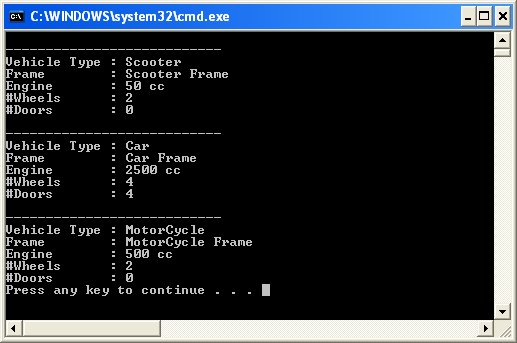
The output is as follows:


Wednesday, 28 July 2010

C++ example for Abstract Factory Design Pattern

The Abstract Factory Design Pattern provides an interface for creating families of related or dependent objects without specifying their concrete classes. The following UML class diagram explains how the Abstract Factory fits with the rest.


The following is example of Abstract factory design pattern:


//Program tested on Microsoft Visual Studio 2008 - Zahid Ghadialy
//Abstract Factory is part of Creational Patterns
//Creational Patterns deal with initializing and configuring classes and objects
//Abstract Factory creates an instance of several families of classes

//We will take an example of Animal Classes and Abstract them.
//There are 2 types of animals; Herbivores and Carnivores.
//The rule of nature is that Carnivores eats Herbivores which will be shown
//Different animas live in different continents but the same rule applies

#include<iostream>
#include<string>

using namespace
std;

//The Herbivore class - The 'AbstractProductA' abstract class
class Herbivore
{

public
:
virtual const
string& getName(void)=0;
};


//Lets define couple of Herbivores called Cow and Deer
class Cow : public Herbivore //The 'ProductA1' class
{
public
:
Cow():name("Cow"){};
//default destructor
const string& getName(void) {return name;}
private
:
string name;
};


class
Deer : public Herbivore //The 'ProductA2' class
{
public
:
Deer():name("Deer"){};
//default destructor
const string& getName(void) {return name;}
private
:
string name;
};


//The Carnivore class - The 'AbstractProductB' abstract class
class Carnivore
{

public
:
virtual const
string& getName(void)=0;
virtual
void eat(Herbivore& h) = 0;
};


//Lets define couple of Carnivores called Lion and Wolf
class Lion : public Carnivore //The 'ProductB1' class
{
public
:
Lion():name("Lion"){};
const
string& getName(void) {return name;}
void
eat(Herbivore& h) //override
{
cout << name << " eats " << h.getName() << endl;
}

private
:
string name;
};


class
Wolf : public Carnivore //The 'ProductB2' class
{
public
:
Wolf():name("Wolf"){};
const
string& getName(void) {return name;}
void
eat(Herbivore& h) //override
{
cout << name << " eats " << h.getName() << endl;
}

private
:
string name;
};


//The 'AbstractFactory' abstract class
class ContinentFactory
{

public
:
virtual
Herbivore& CreateHerbivore() = 0;
virtual
Carnivore& CreateCarnivore() = 0;
};


class
AfricaFactory : public ContinentFactory //The 'ConcreteFactory1' class
{
Herbivore& CreateHerbivore()
{

return
*(dynamic_cast<Herbivore *>(new Cow()));
}

Carnivore& CreateCarnivore()
{

return
*(dynamic_cast<Carnivore *>(new Lion()));
}
};


class
AmericaFactory : public ContinentFactory //The 'ConcreteFactory2' class
{
Herbivore& CreateHerbivore()
{

return
*(dynamic_cast<Herbivore *>(new Deer()));
}

Carnivore& CreateCarnivore()
{

return
*(dynamic_cast<Carnivore *>(new Wolf()));
}
};


//The 'Client' class
class AnimalWorld
{

public
:
AnimalWorld(ContinentFactory& factory):_herbivore(factory.CreateHerbivore()),_carnivore(factory.CreateCarnivore())
{
}

void
RunFoodChain()
{

_carnivore.eat(_herbivore);
}

private
:
Herbivore& _herbivore;
Carnivore& _carnivore;
};


int
main()
{

//Create and run African Animal World
ContinentFactory& africa = *(dynamic_cast<ContinentFactory *>(new AfricaFactory()));
AnimalWorld& world1 = *(new AnimalWorld(africa));
world1.RunFoodChain();

// Create and run the American animal world
ContinentFactory& america = *(dynamic_cast<ContinentFactory *>(new AmericaFactory()));
AnimalWorld& world2 = *(new AnimalWorld(america));
world2.RunFoodChain();

return
0;
}


The output is as follows:


For more details please see: http://www.dofactory.com/Patterns/PatternAbstract.aspx

Wednesday, 21 July 2010

C++ Design Patterns


Over the next few months we will be looking at Design Pattern examples using C++. Here is a good starting point from which the information in this post has been extracted.

Q: What is a Design Pattern?
A: Design Patterns represent solutions to problems what arise when developing software within a particular context.
Quote:
Each pattern describes a problem which occurs over and over again in our environment, and then describes the core of the solution to that problem, in such a way that you can use this solution a million times over, without ever doing it the same way twice.C. Alexander, The Timeless Way of Building, 1979
Quote:
Patterns help you learn from other's successes, instead of your own
failures.Mark Johnson (cited by Bruce Eckel)

Q: How many types of design patterns exist?
A: Basically, there are three categories:

Creational Patterns: deal with initializing and configuring classes and objects
Structural Patterns: deal with decoupling the interface and implementation of classes and objects
Behavioral Patterns: deal with dynamic interactions among societies of classes and objects


Q: What are good books about design patterns.
A: Here are some must-have books:
Design Patterns by Erich Gamma, Richard Helm, Ralph Johnson, John Vlissides (also known as Gang of Four)
Thinking in Patterns with Java, by Bruce Eckel
Thinking in Patterns with C++, by Bruce Eckel


Q: How can I quickly find information about a design pattern?
A: Here are some links on the web:


Creational Patterns

Abstract Factory: Creates an instance of several families of classes
resource 1
resource 2

Builder: Separates object construction from its representation
resource 1
resource 2

Factory Method: Creates an instance of several derived classes
resource 1
resource 2
resource 3

Prototype: A fully initialized instance to be copied or cloned
resource 1
resource 2

Singleton: A class of which only a single instance can exist
resource 1
resource 2

Structural Patterns

Adapter: Match interfaces of different classes
resource 1
resource 2
resource 1

Bridge: Separates an object’s interface from its implementation
resource 1
resource 2

Composite: A tree structure of simple and composite objects
resource 1
resource 2
resource 3

Decorator: Add responsibilities to objects dynamically
resource 1
resource 2
resource 3

Façade: A single class that represents an entire subsystem
resource 1
resource 2

Flyweight: A fine-grained instance used for efficient sharing
resource 1
resource 2
resource 3

Proxy: An object representing another object
resource 1
resource 2

Behavioral Patterns

Chain of Responsibility: A way of passing a request between a chain of objects
resource 1
resource 2

Command: Encapsulate a command request as an object
resource 1
resource 2
resource 3

Interpreter: A way to include language elements in a program
resource 1
resource 2

Iterator: Sequentially access the elements of a collection
resource 1
resource 2

Mediator: Defines simplified communication between classes
resource 1
resource 2

Memento: Capture and restore an object's internal state
resource 1

Observer: A way of notifying change to a number of classes
resource 1
resource 2
resource 3

State: Alter an object's behavior when its state changes
resource 1
resource 2
resource 3

Strategy: Encapsulates an algorithm inside a class
resource 1
resource 2
resource 3

Template Method: Defer the exact steps of an algorithm to a subclass
resource 1
resource 2
resource 3

Visitor: Defines a new operation to a class without change
resource 1
resource 2
resource 3


Source: Code Guru

Wednesday, 14 July 2010

Client/Server communication via sockets

The following is a simple Client Server example that actually covers quite a few different topics. The code is modified from the MadWizard.org Winsock Tutorial. It may be a good idea to go through the StringStreams example here and C/C++ String differences example here.

Please note that the code below is not the best example of coding practice.

Server code:


//Original Client-Server code from www.MadWizard.org
//Part of the Winsock networking tutorial by Thomas Bleeker
//Modified and tested on Microsoft Visual Studio 2008 - Zahid Ghadialy

#include <iostream>
#include <string>
#include <sstream>

#define WIN32_MEAN_AND_LEAN
#include <winsock2.h>
#include <windows.h>

//Add ws2_32.lib in Properties->Linker->Input->Additional Dependencies

using namespace
std;

const
int REQ_WINSOCK_VER = 2; // Minimum winsock version required
const int DEFAULT_PORT = 4444;
const
int TEMP_BUFFER_SIZE = 128;

//Forward Declarations
bool RunServer(int portNumber);

//MAIN
int main()
{

int
iRet = 1;
WSADATA wsaData;

cout << "SERVER STARTED" << endl;
cout << "Initializing winsock... ";

if
(WSAStartup(MAKEWORD(REQ_WINSOCK_VER,0), &wsaData)==0)
{

// Check if major version is at least REQ_WINSOCK_VER
if (LOBYTE(wsaData.wVersion) >= REQ_WINSOCK_VER)
{

cout << "initialized.\n";

int
port = DEFAULT_PORT;
iRet = !RunServer(port);
}

else

{

cerr << "required version not supported!";
}


cout << "Cleaning up winsock... ";

// Cleanup winsock
if (WSACleanup()!=0)
{

cerr << "cleanup failed!\n";
iRet = 1;
}

cout << "done.\n";
}

else

{

cerr << "startup failed!\n";
}

return
iRet;
}


string GetHostDescription(const sockaddr_in &sockAddr)
{

ostringstream stream;
stream << inet_ntoa(sockAddr.sin_addr) << ":" << ntohs(sockAddr.sin_port);
return
stream.str();
}


void
SetServerSockAddr(sockaddr_in *pSockAddr, int portNumber)
{

// Set family, port and find IP
pSockAddr->sin_family = AF_INET;
pSockAddr->sin_port = htons(portNumber);
pSockAddr->sin_addr.S_un.S_addr = INADDR_ANY;
}


void
HandleConnection(SOCKET hClientSocket, const sockaddr_in &sockAddr)
{

// Print description (IP:port) of connected client
cout << "Connected with " << GetHostDescription(sockAddr) << ".\n";
exception e;

char
tempBuffer[TEMP_BUFFER_SIZE];

// Read data
while(true)
{

int
retval;
retval = recv(hClientSocket, tempBuffer, sizeof(tempBuffer), 0);
if
(retval==0)
{

break
; // Connection has been closed
}
else if
(retval==SOCKET_ERROR)
{

exception e("socket error while receiving.");
throw
e;
}

else

{

string tempBufferString(tempBuffer);
cout<<"Received over the socket :"<<tempBufferString<<endl;
string tempString = "Loopbacked: " + tempBufferString + '\0';
strcpy_s(tempBuffer, tempString.length() + 1, tempString.c_str());
if
(send(hClientSocket, tempBuffer, strlen(tempBuffer)+1, 0)==SOCKET_ERROR)
{

exception e("socket error while sending.");
throw
e;
}
}
}

cout << "Connection closed.\n";
}


bool
RunServer(int portNumber)
{

SOCKET hSocket = INVALID_SOCKET, hClientSocket = INVALID_SOCKET;
bool
bSuccess = true;
sockaddr_in sockAddr = {0};

try

{

// Create socket
cout << "Creating socket... ";
if
((hSocket = socket(AF_INET, SOCK_STREAM, IPPROTO_TCP)) == INVALID_SOCKET)
{

cout << "failed Creating socket... \n";
return
false;
}

cout << "created.\n";

// Bind socket
cout << "Binding socket... ";
SetServerSockAddr(&sockAddr, portNumber);
if
(bind(hSocket, reinterpret_cast<sockaddr*>(&sockAddr), sizeof(sockAddr))!=0)
{

cout << "failed Binding socket... \n";
return
false;
}

cout << "bound.\n";

// Put socket in listening mode
cout << "Putting socket in listening mode... ";
if
(listen(hSocket, SOMAXCONN)!=0)
{

cout << "failed Putting socket in listening mode... \n";
return
false;
}

cout << "done.\n";

// Wait for connection
cout << "Waiting for incoming connection... ";

sockaddr_in clientSockAddr;
int
clientSockSize = sizeof(clientSockAddr);

// Accept connection:
hClientSocket = accept(hSocket,
reinterpret_cast
<sockaddr*>(&clientSockAddr),
&
clientSockSize);

// Check if accept succeeded
if (hClientSocket==INVALID_SOCKET)
{

cout << "accept function failed... \n";
return
false;
}

cout << "accepted.\n";

// Wait for and accept a connection:
HandleConnection(hClientSocket, clientSockAddr);

}

catch
(exception& e)
{

cerr << "\nError: " << e.what() << endl;
bSuccess = false;
}


if
(hSocket!=INVALID_SOCKET)
closesocket(hSocket);

if
(hClientSocket!=INVALID_SOCKET)
closesocket(hClientSocket);

return
bSuccess;
}


Client code:


//Original Client-Server code from www.MadWizard.org
//Part of the Winsock networking tutorial by Thomas Bleeker
//Modified and tested on Microsoft Visual Studio 2008 - Zahid Ghadialy

#include <iostream>
#include <sstream>

#define WIN32_MEAN_AND_LEAN
#include <winsock2.h>
#include <windows.h>

using namespace
std;

//Add ws2_32.lib in Properties->Linker->Input->Additional Dependencies

using namespace
std;

const
int REQ_WINSOCK_VER = 2; // Minimum winsock version required
const char DEF_SERVER_NAME[] = "127.0.0.1"; //localhost - can be your server name like "www.google.com"
const int SERVER_PORT = 4444;
const
int TEMP_BUFFER_SIZE = 128;

// IP number typedef for IPv4
typedef unsigned long IPNumber;

//Forward Declarations
bool RunClient(const char *pServername);

//MAIN
int main(int argc, char* argv[])
{

int
iRet = 1;
WSADATA wsaData;

cout << "CLIENT STARTED" << endl;
cout << "Initializing winsock... ";

if
(WSAStartup(MAKEWORD(REQ_WINSOCK_VER,0), &wsaData)==0)
{

// Check if major version is at least REQ_WINSOCK_VER
if (LOBYTE(wsaData.wVersion) >= REQ_WINSOCK_VER)
{

cout << "initialized.\n";

// Set default hostname:
const char *pHostname = DEF_SERVER_NAME;
iRet = !RunClient(pHostname);
}

else

{

cerr << "required version not supported!";
}


cout << "Cleaning up winsock... ";

// Cleanup winsock
if (WSACleanup()!=0)
{

cerr << "cleanup failed!\n";
iRet = 1;
}

cout << "done.\n";
}

else

{

cerr << "startup failed!\n";
}

return
iRet;
}


IPNumber FindHostIP(const char *pServerName)
{

HOSTENT *pHostent;

// Get hostent structure for hostname:
if (!(pHostent = gethostbyname(pServerName)))
{

exception e("could not resolve hostname.");
throw
e;
}


// Extract primary IP address from hostent structure:
if (pHostent->h_addr_list && pHostent->h_addr_list[0])
return
*reinterpret_cast<IPNumber*>(pHostent->h_addr_list[0]);

return
0;
}


void
FillSockAddr(sockaddr_in *pSockAddr, const char *pServerName, int portNumber)
{

// Set family, port and find IP
pSockAddr->sin_family = AF_INET;
pSockAddr->sin_port = htons(portNumber);
pSockAddr->sin_addr.S_un.S_addr = FindHostIP(pServerName);
}


bool
RunClient(const char *pServername)
{

SOCKET hSocket = INVALID_SOCKET;
char
tempBuffer[TEMP_BUFFER_SIZE];
sockaddr_in sockAddr = {0};
bool
bSuccess = true;

try

{

// Lookup hostname and fill sockaddr_in structure:
cout << "Looking up hostname " << pServername << "... ";
FillSockAddr(&sockAddr, pServername, SERVER_PORT);
cout << "found.\n";

// Create socket
cout << "Creating socket... ";
if
((hSocket = socket(AF_INET, SOCK_STREAM, IPPROTO_TCP)) == INVALID_SOCKET)
{

cout<<"could not create socket. "<<endl;
return
false;
}

cout << "created.\n";

// Connect to server
cout << "Attempting to connect to " << inet_ntoa(sockAddr.sin_addr)
<<
":" << SERVER_PORT << "... ";
if
(connect(hSocket, reinterpret_cast<sockaddr*>(&sockAddr), sizeof(sockAddr))!=0)
{

cout<<"could not connect. "<<endl;
return
false;
}

cout << "connected.\n";

cout << "Sending requests and checking for loopbacks... "<<endl;

//Lets sent 100 packets and get it looped back from Server
for(int i = 0; i < 10; i++)
{

int
retval = 0;
stringstream ss (stringstream::in | stringstream::out);
ss << "Message " << i <<"\n";

std::string s = ss.str() + '\0'; //Adding the null charachter
if (send(hSocket, s.c_str(), s.size() + 1, 0)==SOCKET_ERROR)
{

cout<<"failed to send data. "<<endl;
return
false;
}


retval = recv(hSocket, tempBuffer, sizeof(tempBuffer), 0);
if
(retval==0)
{

cout<<"Connection closed"<<endl;
break
;
}

else if
(retval==SOCKET_ERROR)
{

exception e("socket error while receiving.");
throw
e;
}

else

{

// retval is number of bytes read
// Terminate buffer with zero and print as string
tempBuffer[retval] = 0;
cout << "Received " << retval << " bytes. Received : " <<tempBuffer;
}
}
}

catch
(exception& e)
{

cerr << "\nError: " << e.what() << endl;
bSuccess = false;
}


if
(hSocket!=INVALID_SOCKET)
{

closesocket(hSocket);
}

return
bSuccess;
}


The Server Output is as follows:


The Client output is as follows: