Tuesday, 5 April 2011

string::find_next()

I met this new starter who has come from Java background. He was upset because he couldn't find string::find_next() as C++ function. He said Java is much more flexible this way. In reality, its not that bad if you look at the definition of find carefully.

size_t find ( const string& str, size_t pos = 0 ) const;
size_t find ( const char* s, size_t pos, size_t n ) const;
size_t find ( const char* s, size_t pos = 0 ) const;
size_t find ( char c, size_t pos = 0 ) const;

The first one works as find_next as I show in the example below:

//Program tested on Microsoft Visual Studio 2008 - Zahid Ghadialy

#include <iostream>
#include <string>

using namespace
std;

int
main()
{

string someString("Tom is not in. Infact Tom is not going to be in Tomorrow or day after Tomorrow");
string findTheString("Tom");

unsigned
position = 0;

position = someString.find(findTheString);
cout<<"First position of " << findTheString << " is " << position << endl;

//We want to find all the next positions which is after position + findTheString.length()
while(position != string::npos)
{

position = someString.find(findTheString, (position + findTheString.length()));
cout<<"Next position of " << findTheString << " is " << position << endl;
}


return
0;
}


The output is as follows:

Exercise for new programmers:
  1. The last two Tom's are part of 'Tomorrow', how can you make sure they are not printed
  2. The last Tom which is 4294... is equal to -1 or string::npos. How can you stop that being printed without making another check for string::npos
Please dont post answers as they should be trivial exercise and you should be able to figure out without much problems.

Tuesday, 29 March 2011

Reading file names from directory

The other day I had to read all the file names from a directory and I found it really difficult to write a simple program to do that. While searching I ended up at Stack Overflow and the following example is taken from here.

Note that the 'dirent.h' is not available as standard windows file and the best option is to download it from here and add it in your include directory of the project.

The program as follows:


//Program tested on Microsoft Visual Studio 2008 - Zahid Ghadialy
#include<iostream>

#pragma warning( disable : 4996 )
#include "dirent.h"
#pragma warning( default : 4996 )

using namespace
std;

int
main(int argc, char *argv[])
{

if
(argc != 2)
{

cout<<"Usage: "<<argv[0]<<" <Directory name>"<<endl;
return
-1;
}


DIR *dir;
dir = opendir (argv[1]);
if
(dir != NULL)
{

cout<<"Directory Listing for "<<argv[1]<<" : "<<endl;
struct
dirent *ent;
while
((ent = readdir (dir)) != NULL)
{

cout<<ent->d_name<<endl;
}
}

else

{

cout<<"Invalid Directory name"<<endl;
return
-1;
}


return
0;
}

Note that in this program we put Command-line arguments argc and argv. What this means is that the final .exe is run using command prompt and the first parameter will be exe file name and the second parameter will be the directory path or you can add the directory path in Debugging->Command arguments of the properties

You may also encounter the following warning

warning C4996: 'strcpy': This function or variable may be unsafe. Consider using strcpy_s instead. To disable deprecation, use _CRT_SECURE_NO_WARNINGS. See online help for details.

to get rid of it, I have used the #Pragma supressor.

You may also get the following error:

error C2664: 'FindFirstFileW' : cannot convert parameter 1 from 'char *' to 'LPCWSTR'
to get rid of it, go to properties->general->Character set - default is 'Use Unicode Charachter set', change it to 'Use Multi-Byte Character Set'

The output is as follows:

Tuesday, 22 March 2011

Reading Files into Vector

Thought of this while trying to create a parser. The intention is to read a complete text file into a vector and then use this vector for other operations. This program shows how to read from a text file into vectors.

The input file is as follows:

Line num 1

Another line

Line number 3

4th Line!

**%** Last line **%**

Program as follows:


//Program tested on Microsoft Visual Studio 2008 - Zahid Ghadialy
#include <iostream>
#include <vector>
#include <fstream>
#include <string>

using namespace
std;

int
main()
{

vector<std::string> lines;
lines.reserve(5000); //Assuming that the file to read can have max 5K lines

string fileName("test.txt");

ifstream file;
file.open(fileName.c_str());

if
(!file.is_open())
{

cerr<<"Error opening file : "<<fileName.c_str()<<endl;
return
-1;
}


//Read the lines and store it in the vector
string line;
while
(getline(file,line))
{

lines.push_back(line);
}


file.close();

//Dump all the lines in output
for(unsigned int i = 0; i < lines.size(); i++)
{

cout<<i<<". "<<lines[i]<<endl;
}


return
0;
}


Output as follows:

Tuesday, 8 March 2011

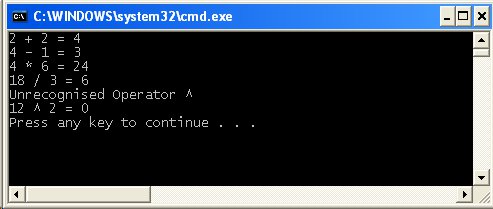
Switch Case using string

When I started thinking of this example, I also faced some of the other problems that I have encountered in my initial days of C++. One of these problems was how to convert String to multiple Ints and how to split strings easily, etc. Hopefully you will find the example useful.


//Program tested on Microsoft Visual Studio 2008 - Zahid Ghadialy
#include<iostream>
#include<string>
#include<sstream>
#include<map>

using namespace
std;

void
split(const string& input, int& num1, int& num2, string& operation);
int
calculate(int num1, int num2, string operation);

int
main()
{

string s[5] = {"2 + 2", "4 - 1", "4 * 6", "18 / 3", "12 ^ 2"};

for
(int i = 0; i < 5 ; i++)
{

int
num1=0, num2=0;
string op;
split(s[i], num1, num2, op);
int
retVal = calculate(num1, num2, op);
cout<<s[i]<<" = "<<retVal<<endl;
}


return
0;
}


void
split(const string& input, int& num1, int& num2, string& operation)
{

istringstream iss(input);
iss >> num1;
iss >> operation;
iss >> num2;
}


int
calculate(int num1, int num2, string operation)
{

enum
Operators {unknown, add, sub, mul, div};
map<string, Operators> mapOfOperators;
mapOfOperators["+"] = add;
mapOfOperators["-"] = sub;
mapOfOperators["*"] = mul;
mapOfOperators["/"] = div;

switch
(mapOfOperators[operation])
{

case
add:
return
num1 + num2;
case
sub:
return
num1 - num2;
case
mul:
return
num1 * num2;
case
div:
return
num1 / num2;
default
:
cout<<"Unrecognised Operator "<<operation<<endl;
}

return
0;
}


The output is as follows:
See Also: Codeguru article on 'Switch on Strings in C++'.

Friday, 4 March 2011

Removing all white-spaces from a string

Continuing on the same theme as the last post. What if all the spaces need to be stripped out from the input string:


//Program tested on Microsoft Visual Studio 2008 - Zahid Ghadialy
#include<iostream>
#include<string>

using namespace
std;

string removeAllSpaces(const string& s)
{

string newStr(s);
bool
spacesLeft = true;

while
(spacesLeft)
{

int
pos = newStr.find(" ");
if
(pos != string::npos)
{

newStr.erase(pos, 1);
}

else

spacesLeft = false;
}


return
newStr;
}


int
main()
{

string aString("This string has multiple spaces problem!");

cout<<"Original : "<<aString<<endl;
cout<<"Modified : "<<removeAllSpaces(aString)<<endl;

return
0;
}


The output is as follows:

Tuesday, 1 March 2011

Removing Multiple White-spaces from a string

A simple program to remove an arbitrary number of white spaces in between words. Program as follows:


//Program tested on Microsoft Visual Studio 2008 - Zahid Ghadialy
#include<iostream>
#include<string>

using namespace
std;

bool
removeDoubleSpaces(string& s)
{

bool
found = true;

int
i = s.find(" "); //Search for 2 spaces
if(i != string::npos)
{

s.replace(i, 2, " ");
}

else

found = false;

return
found;
}


string removeMultipleSpaces(const string& s)
{

string newStr(s);
bool
found = true;

while
(found)
{

found = removeDoubleSpaces(newStr);
}


return
newStr;
}


int
main()
{

string aString("This string has multiple spaces problem!");

cout<<"Original : "<<aString<<endl;
cout<<"Modified : "<<removeMultipleSpaces(aString)<<endl;

return
0;
}


The output is as follows:

Tuesday, 22 February 2011

A generic sort program with 'functors' and 'templates'

Picked up this question from here and made a program out of it. It may be a good idea to quickly brush functors and templates if required.

The program sorts the input Vector provided regardless of the type.


//Program tested on Microsoft Visual Studio 2008 - Zahid Ghadialy
#include <iostream>
#include <vector>
#include <string>
#include <algorithm>

using namespace
std;

class
Int
{

public
:
Int() {x_ = 0;}
Int(const int &x) {x_ = x;}
int
getID (void) {return x_;}
int
x_;
};


class
Str
{

public
:
Str() {x_ = "";}
Str(const string &x) {x_ = x;}
string getID (void) {return x_;}
string x_;
};


template
<typename Object> class Comparator {
public
:
bool
operator()(const Object &o1, const Object &o2) const
{

return
(const_cast<Object&>(o1).getID() < const_cast<Object&>(o2).getID());
}


bool
operator()(const Object *o1, const Object *o2) const {
return
(o1->getID() < o2->getID());
}
};


template
<typename VecObject> void Display(VecObject v)
{

VecObject::iterator it;
for
(it = v.begin(); it != v.end(); ++it)
{

cout<<it->getID()<<", ";
}

cout<<endl;
}


int
main()
{

vector<Int> objects1;
objects1.push_back(Int(3));
objects1.push_back(Int());
objects1.push_back(Int(77));

//print the output
cout<<"objects1 before sort = ";
Display(objects1);
std::sort(objects1.begin(), objects1.end(), Comparator<Int> ());
cout<<"objects1 after sort = ";
Display(objects1);

std::vector<Str> objects2;
objects2.push_back(Str("Hello Hello"));
objects2.push_back(Str("apple?"));
objects2.push_back(Str());
objects2.push_back(Str("1 Jump"));

//print the output
cout<<"objects2 before sort = ";
Display(objects2);
std::sort(objects2.begin(), objects2.end(), Comparator<Str> ());
cout<<"objects2 after sort = ";
Display(objects2);

return
0;
}


The output is as follows:

Tuesday, 15 February 2011

Debugging Mutex and Locks

When there are multiple Mutex's in the program, it may be required to find if a particular thread is locked far longer than necessary. This can cause problems and the output may not be what is expected.

To get round this, I took an old example from here and modified it to help me print some debugging info.

I modified the printSomething() in Singleton.h to add a sleep as follows:


  void printSomething(char *name, int count)
{

Lock guard(mutex_);
Sleep(10);
Lock guard2(mutex_);
std::cout << name << " loop " << count << std::endl;
}


and I modified the Mutex.h as follows:


//Example from http://www.relisoft.com/Win32/active.html
#if !defined _MUTEX_H_
#define _MUTEX_H_

class
Mutex
{

friend class
Lock;
public
:
Mutex () { InitializeCriticalSection (& _critSection); }
~
Mutex () { DeleteCriticalSection (& _critSection); }
private
:
void
Acquire ()
{

DWORD start = GetTickCount();
EnterCriticalSection (& _critSection);
DWORD elapsed = GetTickCount() - start;
if
(elapsed > 15)
{

//Debugging Info
std::cout<<"Debugging Info: Waited at mutex for "<<elapsed<<std::endl;
}
}

void
Release ()
{

LeaveCriticalSection (& _critSection);
}


CRITICAL_SECTION _critSection;
};


#endif


The output is as follows:
The small problem with the above approach is that if a Thread is deadlocked, we may not get the debug output as we would have to kill the process.

Wednesday, 9 February 2011

Add two unsigned integers without using '+'

I found this very interesting discussion (and the program) to add two numbers without the use of the arithmetic operator '+'. The obvious guess would be to use the Bitwise operators.

The logic behind the addition operation using the bitwise operators is as follows:


integer1 =  3  = 0011b
integer2 = 5 = 0101b

first operation second operation third operation
0011 0011
shift by one
0101 0101

______ ______
XOR 0110 AND 0001 ------> <<1 0010

Again...
first operation second operation third operation
previous XOR 0110 0110 shift by one
previous <<1 0010 0010
______ ______
XOR 0100 AND 0010 ------> <<1 0100

Again...
first operation second operation third operation
previous XOR 0100 0100 shift by one
previous <<1 0100 0100
______ ______
XOR 0000 AND 0100 ------> <<1 1000

Again...
first operation second operation
previous XOR 0000 0000
previous <<1 1000 1000
______ ______
XOR 1000 AND 0000
When AND iguals 0 the result of XOR is iqual to the sum of the two integers

The program is as follows:


//Program to add two numbers by using boolean operators
//Ref: http://www.daniweb.com/forums/thread84950.html
//Program tested on Microsoft Visual Studio 2008 - Zahid Ghadialy
#include<iostream>

using namespace
std;

unsigned long
add(unsigned integer1, unsigned integer2)
{

unsigned long
xor, and, temp;

and
= integer1 & integer2; /* Obtain the carry bits */
xor
= integer1 ^ integer2; /* resulting bits */

while
(and != 0 ) /* stop when carry bits are gone */
{

and
<<= 1; /* shifting the carry bits one space */
temp = xor ^ and; /* hold the new xor result bits*/
and
&= xor; /* clear the previous carry bits and assign the new carry bits */
xor
= temp; /* resulting bits */
}

return
xor; /* final result */
}


int
main()
{

int
num1 = 13, num2 = 27;

cout << num1 << " + " << num2 << " = " <<add(num1, num2) << endl;

return
0;
}


The output is:
13 + 27 = 40

See the original discussion here.

Wednesday, 2 February 2011

Consequences of Ignoring Compiler Warnings

Though this is a fictional program that I have picked up from here, I have seen similar problems in real life.

Lets say my program (below) was expected to return this


but instead returned:

Program as follows:


//Program tested on Microsoft Visual Studio 2008 - Zahid Ghadialy
#include<iostream>

using namespace
std;

class
Bclass
{

public
:
Bclass() {}
virtual
void func()
{

cout<<"In Bclass::func()"<<endl;
}
};


class
Dclass : public Bclass
{

public
:
Dclass() {}
virtual
void func()
{

cout<<"In Dclass::func()"<<endl;
Bclass:func();
}
};


int
main()
{

Dclass d;
d.func();
//...
return 0;
}


The clue of the problem was given by the compiler that generated the following warning:

main.cpp(23) : warning C4102: 'Bclass' : unreferenced label

pointing to the line

Bclass:func();

The problem lies in the fact that due to a single : rather than :: the line above is being treated as label and since its an unreferenced label it goes back to the start of the same function.

You can read the complete discussion here. Make sure to check the warnings the next time your program behaves unexpectedly.